How it works
A clear process from course outcome to confirmed work.
Every step has an owner. Every task ends with a visible status — including the ones that are not finished.
Six steps, from agreement to evidence.
-
Agree outcomes
Agree with your organisation which workplace outcomes should follow the training, and how confirmation will be judged.
-
Translate into tasks
Turn each outcome into specific, actionable tasks for employees — prepared in advance so nobody starts from a blank page.
-
Apply and record
Employees apply tasks at work and record what they did, what they observed and any obstacle or support they need.
-
Supervisor review
A supervisor reviews each record against the task standard and confirms it, asks for clarification or requests a revision.
-
Follow up
We follow up on outstanding tasks, unresolved obstacles and pending reviews until each one has a clear status.
-
Report
Dated reports show what is confirmed, what is still pending, what helped or hindered, and the next action and its owner.
Who does what
Clear roles. Human decisions.
-
Employee
Applies the task at work, records what was done and observed, and raises obstacles or requests support.
-
Supervisor
Reviews each record against the agreed standard, then confirms, asks for clarification or requests a revision.
-
Management
Follows progress during the application period and acts on obstacles and support needs.
-
OJT-AI team
Sets up tasks and criteria with you, coordinates follow-up, chases pending items and prepares the reports.
Honest statuses
Not everything is reported as done.
Each situation keeps its own status, so reports separate confirmed application from everything still in progress.
- Applied · awaiting review
- The employee has recorded the task; a supervisor has not yet reviewed it.
- Confirmed
- A supervisor reviewed the record against the task standard and confirmed application.
- Clarification requested
- The supervisor needs more detail before deciding.
- Revision requested
- The task returns to the employee with an explanation of what needs to change.
- Obstacle · support needed
- Something is blocking application. It stays open — even after confirmation — until it is addressed.
- No opportunity to apply
- The work situation did not arise. This is recorded as such, not as failure and not as success.
What the evidence means
Records and review — not automatic judgements.
What a confirmed task shows
- The employee’s own account of what they did and observed.
- A named supervisor’s review of that account against the agreed task standard.
- The date and status history of the task.
What it does not claim
- Independent physical verification of competence.
- Proof of financial impact or return on investment.
- An automated assessment of employee performance.
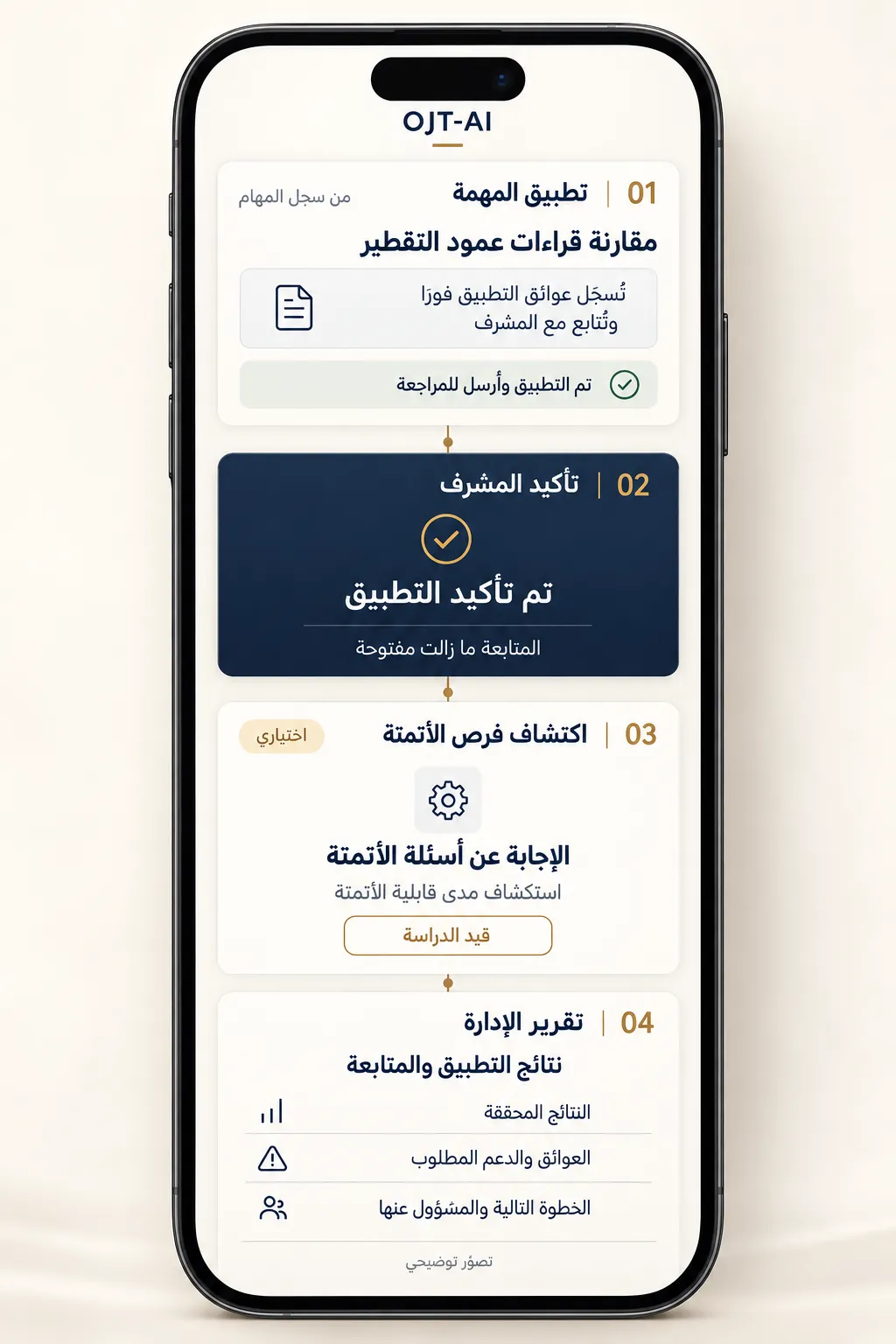
Illustrative screens
Simple for the people doing the work.
Employees, supervisors and management use OJT-AI from a mobile or desktop browser. The interface supports Arabic and English.
- 01 Task application
- 02 Supervisor confirmation
- 03 Automation discovery (optional)
- 04 Management report
Optional
Choose what you switch on.
AI assistance
Can help employees with course-related application questions and help supervisors draft responses. It does not write evidence for employees or confirm results for supervisors. OJT-AI works without it.
Automation discovery
An optional path that collects employees’ experience of repetitive work and obstacles, so specialists can assess what might be worth automating. Recording an opportunity does not approve or implement it.
Getting started
How an engagement begins.
- 01
Introductory call
30 minutes to understand the course, the people involved and the results you expect at work.
- 02
Scope and data
Agree participants, tasks, confirmation criteria, the information to be recorded, hosting, access and retention — in writing before any live data is collected.
- 03
Setup session
Turn course outcomes into tasks and prepare supervisors for their review role.
- 04
Follow-through and reports
Run the application period with dated reports during and at the end.
Scope, schedule and commercial terms are agreed with each organisation.
Discuss a corporate pilot
Start with one course and one team.
In a 30-minute call we will look at a course you already run, the outcomes you expect at work, and what a first follow-through programme could cover.
All questions